Betika is quite a hit in Uganda’s betting scene despite having only recently launched in the country. It is a user-friendly betting site packed with a variety of games in the casino, including Aviator and others. Its sportsbook is rich in choice with a huge variety of over 20 sports and e-sports to keep both the experienced and new players entertained.
But to conform to the Ugandan standards, where most people use mobile phones, Betika has introduced a Mobile app.
Betika, including in its mobile app, offers prematch and live games, crash games, live score and new promos quite often.
READ OUR FULL REVIEW OF BETIKA HERE: Betika Review
How to get the Betika App
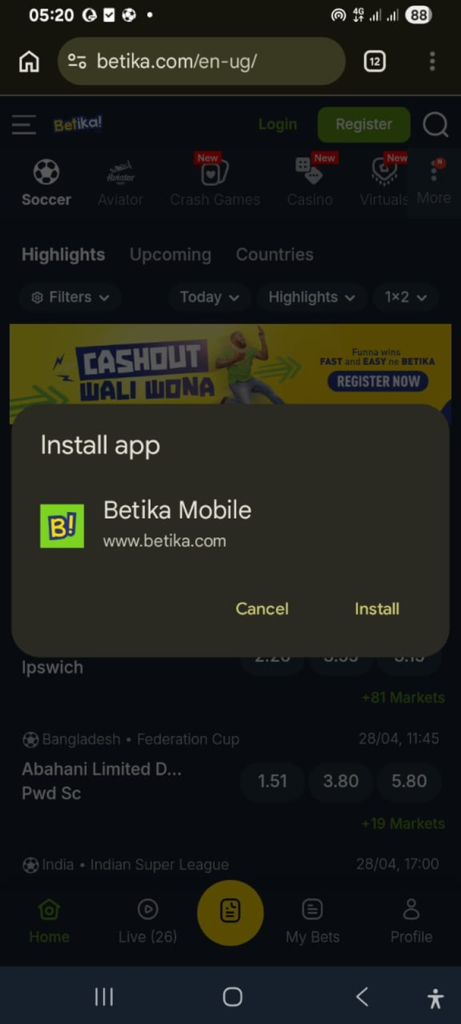
Unlike many other local competitors like Gals and 1win, which use either Android or iOS APKs, Betika uses a simple app compatible with all phones. To download the app, simply follow these procedures;
- Log in to your Betika Account.
- Tap the three dots placed at the top right corner of your browser.
- Tap on “Add to Home screen” and then tap on Install.
How to use the Betika App
Understanding how to use the Betika app is crucial if you want to bet efficiently and avoid mistakes. The first and main distinctive part of the app is its clean Sports Tab on the main section. The tab enables you to browse leagues like the Premier League, La Liga, Serie A, select matches and odds and add selections to your bet slip. At the top bar, there is a tab for all the other sports and casino games offered by Betika Uganda. They include tennis, boxing, rugby, basketball, cricket, table tennis, volleyball, and more, nice ones like snooker and floorball.
It has a Live Betting section that gives you real-time odds updates and allows for quick betting during matches. Once you start betting, the betslip will appear instantly after selecting the odds, where you willThey include main sports like football, the most popular, to tennis, boxing, rugby, basketball, cricket, table tennis, volleyball and more, nice ones like snooker and floorball.
The app’s interface has a Live Betting section where you get real-time updates on odds and allows for quick betting during live matches. And once you’ve started making your selections that you are betting on, a betslip will appear instantly. Enter your stake and confirm the bet. Above it, there is a My Bets section that tracks active and settled bets for you to keep up with your history.
Enter your stake and confirm the bet. Above it, there is a My Bets section that tracks active and settled bets for you to keep up with your history.
Lastly, the Profile Section will enable you to easily deposit and withdraw funds and manage your account settings.
How to deposit on the Betika Mobile app
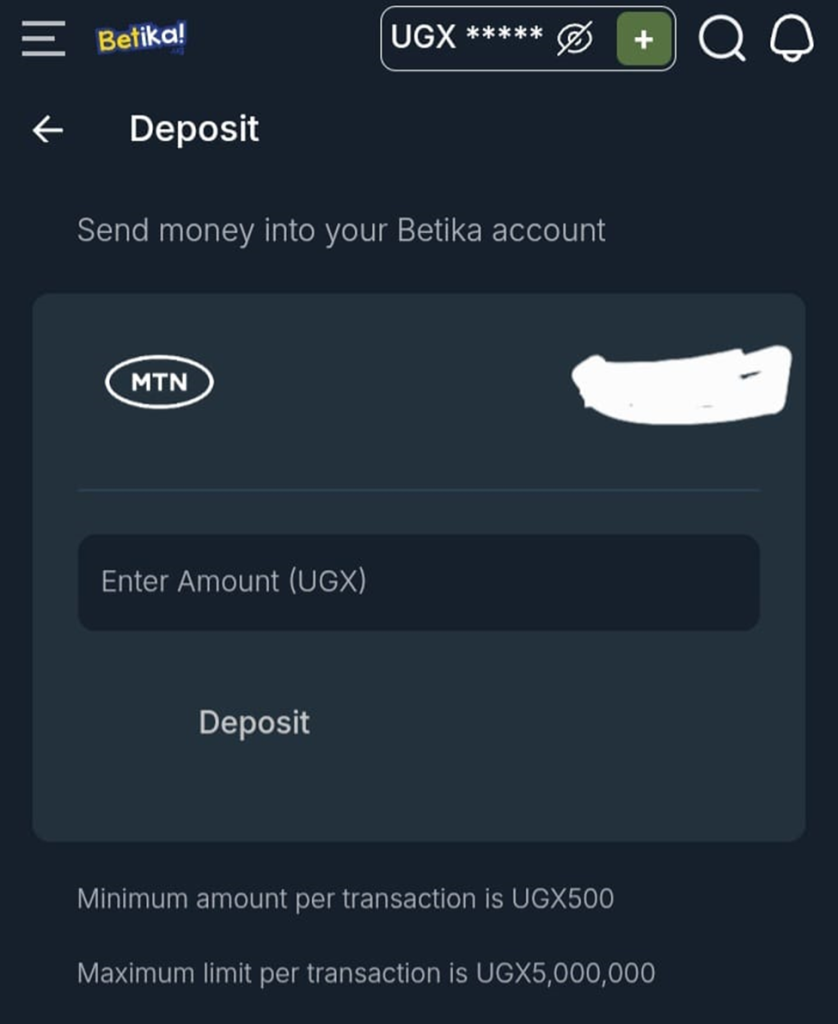
To deposit into your account through the app, open the Betika Mobile App by clicking on its icon in your apps. Check at the top right of your interface and click the + sign near your balance.
A form will pop up where you will be required to enter the amount to deposit. Note that Betika will link this to the phone number you used for registration.
Enter the amount and click on Deposit, and confirm the transaction by entering your password on the mobile money screen that will appear on your phone. Note that the minimum amount per transaction is UGX 500 while the maximum limit per transaction is UGX 5,000,000.
Alternatively, you can deposit your money via USSD by following these simple steps;
• Dial *165# on your phone to open your mobile money menu
• Select 4: Payments
• Select 6: Lotto and Sports Betting
• Select 3: Betika
• Select 2: Deposit
• Enter the amount you want to deposit.
How to withdraw from the Betika App
To withdraw funds, simply open the mobile app from your apps and click on profile at the bottom right corner of your screen. Once you tap on it, a screen will open with several options; select withdraw.
You will see a screen like this one below;
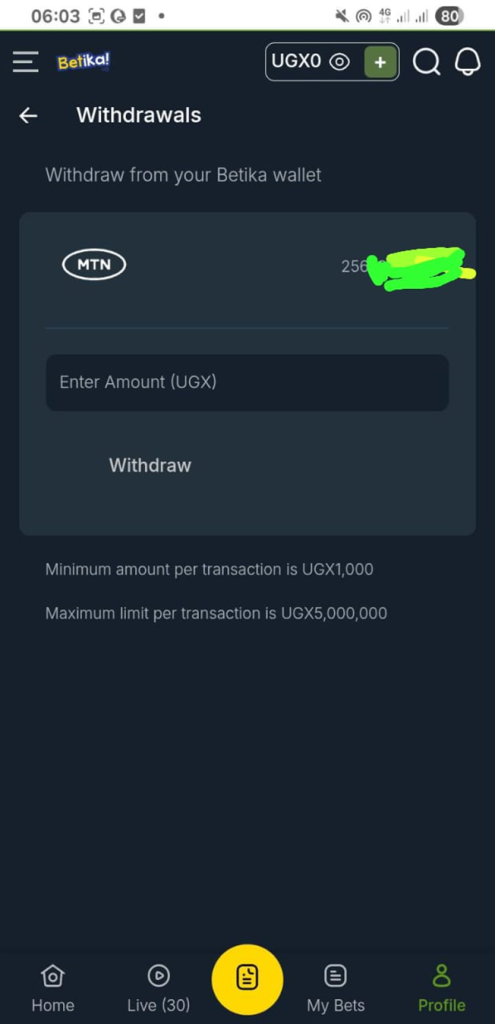
Enter the amount you want to withdraw and click withdraw. Not that Betika will only send your money to the phone number you used during registration. The minimum amount to withdraw per transaction is UGX 1,000, and the maximum is capped at UGX 5,000,000 per transaction. The funds are typically sent directly to your mobile money account.
Betika app performance and speed
A feature that stands out on the Betika app is its speed. The experience is quite good and fast because the app is lightweight in design and is optimized very well for low-data usage, which ensures minimal loading delays. It has a data-saving mode that makes it ideal for punters in areas with unstable internet, which is a big advantage in many parts of Uganda.
Its interface design is broken down into a home screen that displays featured matches and highlights jackpots and promotions, a sports page which is easy to scroll and filter and a casino & aviator section with quick access from the main menu and smooth transitions between games.
Advantages of the Betika mobile App interface
• It’s a clean and user-friendly design
• It has fast loading speeds
• It is very easy to navigate
• It is well optimised for mobile money users
• It works well on low internet speeds.