Fortebet Uganda has grown into one of the top local brands in the sports betting industry in Uganda. The sports betting site engages in aggressive marketing by sponsoring local brands and a visible and vibrant social corporate responsibility that has endeared the brand to Ugandans.
And they haven’t stopped there! As the new era of internet and mobile phones continues to dominate the younger population, the company has matched that by introducing the Fortebet app that makes betting easier and enjoyable for the punters.
Topbets Uganda brings you all you need to know about the app, from downloading, installing, registering and how to fix common errors.
What is the Fortebet App?
The Fortebet app is a mobile application that grants punters access to Fortebet’s sportsbook in order to place their bets, manage Fortebet accounts and deposit and withdraw from their Android mobile devices.
The app and website operate under Massalia SMC Limited, which is fully licensed in Uganda. Unlike many bookmakers, Fortebet has built a very strong physical presence and owns physical betting shops across the country that complement the app and website. The shops are also used to deposit and withdraw funds from the website and app.
The Fortebet app is available for Android users in Uganda and fully supports all the betting features available on the website.
Fortebet App Features
The Fortebet app offers a range of essential features tailored to local bettors. They include the following:
1. Sports betting access – Ugandan punters can bet on major sports, especially football, which remains the most popular market in Uganda.
2. Simple interface – the app is user-friendly because it focuses on simplicity and functionality instead of a complicated, advanced design in some other apps.
3. Fair cashout feature – one of the most important features in the Fortebet app is their fair cashout. This feature allows punters to cash out part of their payouts even before the entire bet is settled. For example, if part of your accumulator wins, you can receive a proportional payout early, though a small fee may apply.
4. a VIP points system – Unlike many bookmakers, Fortebet does not offer a traditional welcome bonus. Instead, users receive 1,000 VIP Points after registration and then the points accumulate over time and can be used based on the platform’s terms
5. Account management – the app helps punters manage their accounts to track betting history, check balances and manage settings.
6. Mobile Money integration – The app supports both MTN Mobile Money and Airtel Money, making it easier for punters to deposit and withdraw.
7. Lightweight and fast – Unlike some heavy apps, the Fortebet app weighs only 1.95MB and is optimized to work well even on low-end Android devices and slower internet connections.
Fortebet App Download in Uganda
To download the Fortebet app, follow these steps:
1. Open your phone and visit the Fortebet website via this link: https://www.fortebet.ug/
2. Search for the DOWNLOAD APP button located at the bottom left of the menu tab and click.
3. Choose one of the two options between Android and iOS.
4. Download the APK file
5. Enable installation from unknown sources
6. Install and open the app
How to install the Fortebet app
Since there are two different apps for Android and Apple phones, the steps to install are not the same.
For Android,
Click the button labelled DIRECT APP DOWNLOAD Android.
Open the file with an enabled third-party package installer.
Confirm the installation of ForteBet.
Open the app, log in to your ForteBet account and stake your bets!
For iOS,
7. Open an internet browser and open the link https://www.fortebet.ug/
- Tap the sharing icon
- Scroll down and tap Add to Home Screen in the menu.
- Go to the Home Screen and tap on the Fortebet icon.
- Open the app, log in to your Fortebet account and stake your bets!
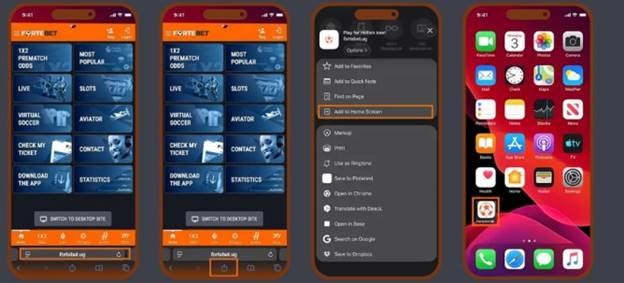
Steps to download the Fortebet app on iOS
NOTE: The Fortebet app requires Android 5.0 or higher to download and function better. The app is not available on the Google Play Store, but on the website directly.
How to Register on the Fortebet App in Uganda
The Fortebet app’s registration process is slightly more detailed compared to other betting apps because of identity verification requirements.
Registration steps
1. Open the newly-installed app
2. Click register (reg.) at the top right of the screen.
3. Fill in your details beginning with your official name and a username that you prefer to use on the app.
4. Enter your registered phone number that will be connected to your account and email, and select your gender.
5. Enter your date of birth, choose your nationality and enter your national identification number on your national ID.
6. For foreigners, choose your country of origin and enter a passport or refugee number.
7. Enter a promo code if you have one and accept the terms and conditions by checking the box.
8. Click confirm registration
9. You will receive an SMS with login details to your phone number provided in the registration form. Enter that password and vroom, you’re now registered.
10. You’ll be required to set your own password in the next screen that pops up.
11. Finally, enter your e-mail address and get 1,000 VIP points bonus for registering.
Fortebet App login process
- Open the Fortebet app
- Click Login at the top right corner of your screen
- Enter the username and password
- Click Login
How to recover a lost password
If you’ve lost or forgotten your Fortbet password and can’t access it, open the app and click login at the top right corner of your interface.
- Then click on Forgot Password found below the username and password.
- You’ll be required to enter your phone number attached to the account and click NEXT.
- A four-digit recovery code will be sent to your SMS inbox, which you’ll enter in the field provided and click next.
- Your password will be reset, and a and an SMS with a new password will be sent to your SMS.
- Enter the password and click NEXT. You will be asked to change your password to one you can easily remember.
How to deposit and withdraw on the Fortebet App
Payments on the Fortebet app are done using two methods: the physical shops and the Airtel and MTN Mobile Money wallets.
How to deposit via mobile money
To deposit, open the Fortebet app and log in. Click your profile in the top-right corner and select DEPOSIT MONEY.
The three options will pop up for you to pick your preference.
For Airtel, you can choose between loading from your registered phone or a different Airtel line.
To use your phone number, click on option 1 and enter the number and amount of money you want to deposit, and you will receive a payment request on your registered phone number, which you’ll be required to approve, and the money will be transferred to your account immediately.
The minimum amount of a deposit using this Airtel route is UGX 1,000, and the maximum is UGX 5,000,000 per transaction up to UGX 20,000,000 per 24 hours. Whereas Fortebet doesn’t charge for deposits, standard Airtel fees will be applied.
If you’re using the second option to load from a different number, follow these steps:
- Dial *185# to open the mobile money menu on your phone.
- Select option 5. Payments
- Select settings and gaming
- Select Fortebet in option 4
- Enter the amount you want to deposit
- Enter your reference or reason for payment
After finishing the steps, call Fortebet on toll-free lines at 0800 202 202 or 0800 303 303 for the customer team to load your money into your account.
NOTE that the process is the same for MTN direct deposit, but if you’re using a different number, follow these steps:
- Dial *165# to open the MTN Mobile Money menu
- Select Payment in option 4
- Select goods and services in option 4
- Enter merchant code
- Enter your payment reference
- Enter amount
- Enter your MTN Mobile Money to confirm the payment
- Wait for your transaction to be processed.
For withdrawals, follow the same procedure as for deposits.
Common Fortebet App Issues and How to Fix Them
1. App not installing – always enable installation from unknown sources in your Android settings.
2. Login issues – Check credentials and try to reset password via SMS.
3. Slow app performance – Use a stable internet or restart your mobile device
4. Deposit not reflecting – Wait for a few minutes, then confirm the mobile transaction, and if nothing changes, contact customer care for support.
5. Withdrawal delays – check and ensure your account details are correct, wait up to 24 hours and contact support if delayed.
Key Things to Know About the Fortebet App
✔ Licensed in Uganda
✔ No traditional welcome bonus
✔ Offers 1,000 VIP Points instead
✔ Supports mobile money and branch transactions
✔ Strong offline + online presence
✔ Simple but functional app
FAQs -Fortebet App Uganda
What is the Fortebet App?
The Fortebet app is a mobile application that grants punters access to Fortebet’s sportsbook in order to place their bets, manage Fortebet accounts and deposit and withdraw from their Android mobile devices.
How do I download the Fortebet App in Uganda?
Visit the Fortebet website, click on DOWNLOAD APP and choose either Android or iOS, then download the APK file and enable installation from unknown sources in your phone settings. Finish the download.
Does the Fortebet App support Mobile Money?
Fortebet app supports both MTN and Airtel mobile money wallets for both deposits and withdrawals.