
The betPawa app has become one of the most sought-after betting tools among Ugandan punters and for good reason. It’s fast, lightweight and designed for mobile-first users who want to bet quickly without draining data or slowing down their phones.
Topbets Uganda breaks down the app for you, bringing everything that you need to know from installation, login, features and troubleshooting.
What is the betPawa App?
The betPawa app is simply a mobile application designed to grant punters seamless access to the betPawa sportsbook and account management tools. The app is simply user-friendly, weighing only 1.85MB, making it ideal for Ugandan users who rely on affordable smartphones and limited data bundles.
Key features of the betPawa App
Auto-login – the betPawa app can save your passwords safely, allowing you to never log in again as long as the app is installed. This helps you to place your bets faster with this feature.
Automatic notifications – with the app, you can never miss an offer from betPawa. Just turn notifications on and get to receive the notifications faster than the website users.
Fast performance – The app is optimized to load quickly, even on slow internet connections, and it actually uses even less than the website.
Easy navigation – The interface is clean and straightforward, and you can access everything from the sports markets, live betting, bet slip, to the account section, all within a few taps.
Live betting – punters can place bets on ongoing matches with real-time odds updates, especially in football, which dominates the platform.
Progressive 500% win bonus – The betPawa app automatically calculates your bonus when placing accumulator bets. From 3 selections (3%) to 45 selections (500%), the rewards grow significantly.
Full account control – with the app, you can easily check your balance, view transaction history and track active and settled bets.
Secure transactions – The app supports MTN and Airtel Mobile Money for both deposits and withdrawals.
How to download the betPawa App
First, go to the betPawa website using your phone browser.
Then, scroll to the bottom of the homepage and find the “Download App” or go directly to www.betpawa.ug/android-app.
Click on start download and wait for it to complete. You will have to enable your settings under Device Administration. Tap to allow downloads from Unknown Sources and confirm.
How to install the BetPawa App on Android
After completing the install betpawa app, the next step is installation. Follow these steps to install the app.
Open your downloaded APK file from your download folder in the phone’s library.
If prompted, enable “Install from Unknown Sources” in settings and tap Install. Then, wait a few seconds for installation to complete before opening the app and starting to use it.
How to download the betPawa App on iPhone
iPhone users may ask where they can download the betPawa app. However, there is no official iOS app available at the moment, but users can use the mobile website, which is fully optimized for iPhones.
What iPhone punters can do is to open their mobile phone browsers and visit the betPawa website, then log in or register and add to the home screen for quick access. This creates an app-like experience without needing installation.
How to register on the betPawa app
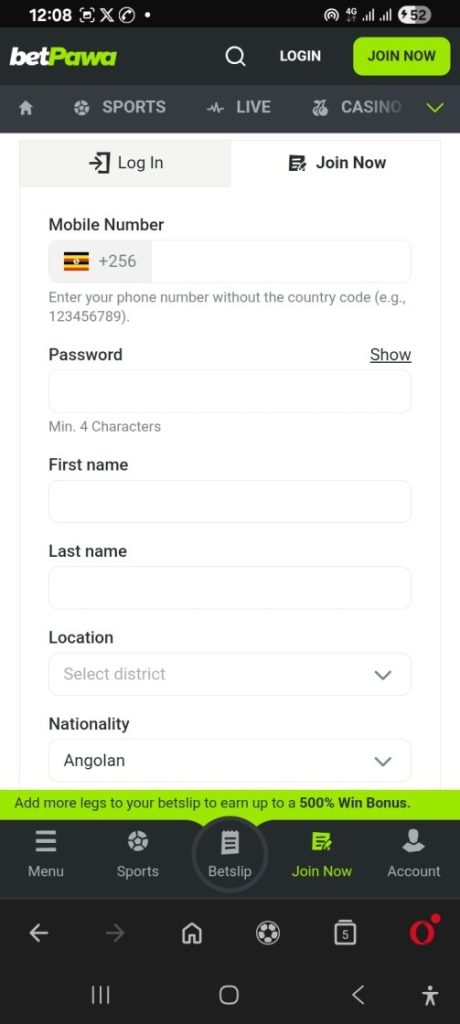
To register, click on JOIN NOW in the top-right corner of the app interface. A form for you to fill out your personal details will emerge.
Enter your registered mobile phone number that you will use for the account.
Propose your password.
Enter your official name, location or district and nationality.
You will be required to enter your nationality identification number. In case you don’t remember your NIN, dial *216# to check the NIN associated with the phone you are using.
For non-Ugandans, select your country of origin and confirm using either your non-resident document or refugee card number.
Submit the form.
betPawa App Login Process Explained
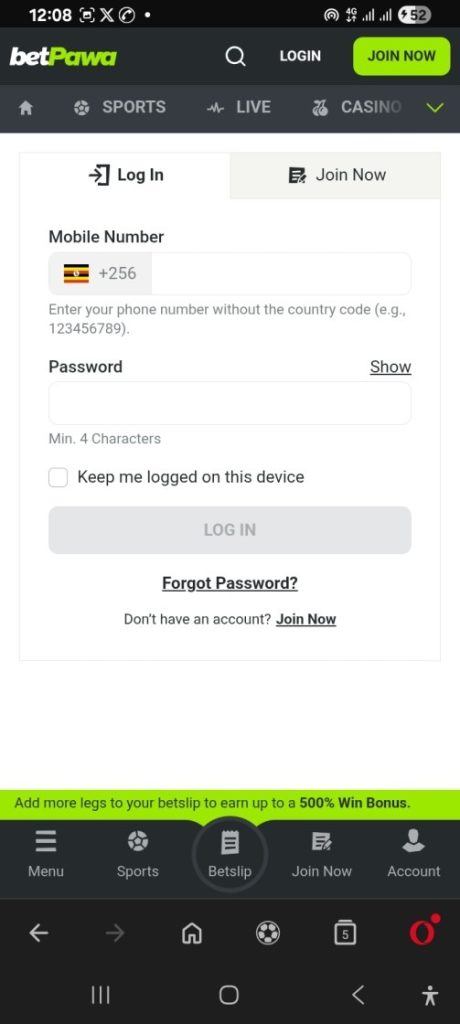
The betpawa app login process is easy. Open the app and tap Log in on the top-right corner.
Enter your registered phone number and the password, and click LOG IN, and you’ll be directed to your dashboard immediately.
How to log in to betPawa app
- Open the betPawa app
- Tap LOGIN
- Enter your phone number
- Enter your password
- Click Login
How to recover a lost password
If you’ve lost your password, never mind. Open the app and click LOG IN, and go to Forgot Password. Enter the mobile number that you registered on your betPawa account and choose which channel you want to receive your verification code. The options include SMS, WhatsApp, Telegram and a direct call.
Enter the verification code sent to you and reset your password. If you’re prone to losing your password, always check on the “
Keep me logged on this device” while logging in for the app to auto-save your password.
In short:
- Go to Log IN
- Click Forgot Password
- Enter your phone number
- Request a verification code
- Enter the code received
- Set a new password
How to Deposit and Withdraw on the betPawa App
One of the strongest advantages of the betPawa app is its seamless mobile money integration.
How to Deposit on the betPawa App
betPawa offers only two options for depositing and withdrawing. These two are MTN and Airtel Mobile Money.
Open the app, log in, and click on the + sign at the top-right corner of the interface just beside your account balance. Another form will appear where you can deposit using your registered mobile number.
Enter the amount to deposit and click DEPOSIT. Confirm the deposit request to Intelworld Co., Ltd. on your phone to complete the deposit process by entering your password. Always make sure any pop-up blocker is disabled. The minimum deposit is UGX 500, and the maximum is set at UGX 7,000,000.
Option 1: Online deposit
- Click Deposit
- Enter amount (UGX 500 – UGX 7,000,000)
- Confirm on your phone
- Enter your Mobile Money PIN
- Complete transaction
Option 2: USSD Deposit
Besides the direct deposit, betPawa app also offers a USSD option, which you can dial as explained step-by-step here:
For MTN users:
- Dial *185# to open the MTN MoMo menu on your phone.
- Select payments in option 4
- Choose goods & services in option 4
- Enter BETPAWA
- Enter PAWA as reference
- Input amount
- Confirm with PIN
For Airtel users:
- Go to your mobile phone and dial *165#
- Select Payments
- Choose Betting
- Select betPawa
- Enter the amount and confirm
How to withdraw from the betPawa App
To withdraw, open the app. Scroll to the bottom of the app and select withdraw in the menu at the bottom. The app will redirect to the withdrawal page automatically.
A withdrawal form attached to your phone number will be opened. Enter the amount and confirm the withdrawal. The minimum withdrawal is UGX 1,000, and the maximum is UGX 7,000,000. Withdrawals are simple and FREE.
- Go to your profile
- Click Withdraw
- Enter any amount between UGX 1,000 and UGX 7,000,000.
- Confirm request
Common betPawa App Issues and How to Fix Them
App not installing – this may be caused by some unknown sources that have been disabled.
Solution – try to enable installation from unknown sources in settings.
App not opening – this might be caused by outdated versions and issues of device compatibility. To solve it, download the latest version and restart your phone.
Login issues – this might arise because of an incorrect password and network issues; therefore, try to reset the password and check the internet connection.
Deposit delays – it can be caused by network delay and mobile money confirmation pending. Just wait for a few minutes, then check the transaction message and contact support if delayed.
Withdrawal issues – these are caused by incorrect phone numbers and account verification issues. Always ensure the number matches registration, or if it persists, contact support.
FAQs – betPawa App
How to download the BetPawa app?
Open the betPawa website on your mobile phone browser and scroll to the bottom. Find the “Download App” or go directly to www.betpawa.ug/android-app.
How do I install the betPawa app?
Download the APK file and open it, then allow installation from unknown sources, tap install and launch the app.
How to download the BetPawa app on iPhone?
There is no official iOS app available at the moment, but users can use the mobile website, which is fully optimized for iPhones.
Does the betPawa app support withdrawals?
Yes, withdrawals are processed directly to your Mobile Money account and are free of charge.